Putting a file in the cloud does not automatically make it private.
Most cloud storage services encrypt data in some form, but the more important question is who controls the keys needed to read it. If the provider can decrypt your files, encryption protects against some threats without preventing the provider itself from accessing the data. Privacy-focused cloud storage takes a different approach by encrypting files before they leave your device and limiting the provider’s ability to decrypt them.
That difference is what separates the encrypted cloud storage services in this comparison.
Proton Drive, Sync.com, Tresorit, Filen, Internxt, and pCloud all offer stronger privacy options than ordinary server-side encryption, but they do not implement that protection in exactly the same way. Encryption can cover the entire account or only a protected folder. Sharing controls differ. Recovery can become more complicated. Some services emphasize personal storage, while others are built around secure collaboration.
The useful comparison is therefore not simply which provider says it is encrypted. It is how much of your data the encryption protects, who can unlock it, and what compromises come with that privacy model.
Key Takeaways
- The word “encrypted” does not tell you who can access your files. The critical distinction is whether the provider controls the decryption keys or your files remain inaccessible to the provider.
- Proton Drive, Sync.com, Tresorit, Filen, and Internxt build provider-inaccessible encryption into their core storage model. You do not have to move sensitive files into a separate private vault.
- pCloud takes a different approach. Its strongest client-side, zero-knowledge protection applies to files placed inside the separate Crypto folder rather than the entire account.
- Secure sharing matters almost as much as secure storage. Passwords, expiration dates, recipient permissions, and encrypted links determine what happens when private files leave your personal account.
- Stronger privacy changes recovery. A service that cannot decrypt your data may also have limited ability to rescue it when you lose the credentials or recovery information needed to unlock your files.
- Privacy should not be judged by encryption alone. Account security, transparency, sharing controls, version history, storage limits, and everyday usability all affect whether a service is practical to use.
Disclosure: This website contains affiliate links. I may earn a commission if you make a purchase through these links, at no additional cost to you.
Encrypted Cloud Storage Services at a Glance
| Service | Private Encryption Scope | Can the Provider Decrypt Protected Files? | Sharing Approach | Main Tradeoff |
|---|---|---|---|---|
| Proton Drive | Files and encrypted file metadata across Drive | Proton says no | End-to-end encrypted sharing | Larger storage allocations often come through broader Proton plans |
| Sync.com | Account-wide encrypted storage | Sync says no | Secure links, passwords, expiration, revocation | Personal storage tiers make larger jumps in capacity |
| Tresorit | Account-wide end-to-end encryption | Tresorit says no | Encrypted links with detailed access controls | Storage, device, and file-size limits vary significantly by tier |
| Filen | Account-wide client-side encryption | Filen says no | Encrypted file sharing and collaboration | Account recovery requires extra care because Filen cannot simply decrypt your files |
| Internxt | Account-wide zero-knowledge encryption | Internxt says no | Encrypted links, passwords, and access permissions | Storage plans increasingly bundle additional privacy tools |
| pCloud | Client-side encryption inside Crypto folder | Not for Crypto files | Regular pCloud sharing tools outside the private vault model | Strongest privacy is limited to a separate protected area |
Encrypted Cloud Storage Services Compared
Proton Drive: Privacy Built Into the Storage Layer
Proton Drive treats end-to-end encryption as the default rather than an optional security feature.
Files are encrypted before they leave the device, but Proton also extends that protection beyond file contents. Filenames, folder names, and thumbnail previews are encrypted as well. That matters because metadata can reveal a surprising amount about stored information even when the underlying document cannot be read.
The privacy model does not prevent Proton Drive from behaving like ordinary cloud storage. Users can sync files, upload photos, create documents and spreadsheets, restore older file versions, and share files with other people.
That combination makes Proton Drive particularly notable in this comparison. Privacy is not confined to a vault that has to be managed separately from everyday files.
Proton has also continued expanding Drive beyond basic storage. Its current applications cover web, Windows, macOS, Android, and iOS, while a command-line interface introduced in 2026 adds file management and automation from Windows, macOS, and Linux.
The main practical limitation is capacity structure. Drive Plus currently provides 200 GB, while larger storage allocations are attached to broader Proton bundles or multi-user plans. Someone primarily looking for several terabytes of standalone encrypted storage may therefore find the plan structure less direct than providers with larger storage-only tiers.
Proton’s current Drive privacy policy confirms that file contents, filenames, folder names, and thumbnail previews are protected with end-to-end encryption, while its Drive plans show how storage capacity changes across its current account tiers.
Where it stands out: Privacy applies broadly without requiring the user to decide which files deserve stronger encryption.
Main compromise: Larger storage requirements can push users toward broader Proton packages rather than a simple high-capacity Drive plan.
Sync.com: Encrypted Storage With Strong Sharing Controls
Sync.com combines provider-inaccessible storage with a strong emphasis on moving files between people.
Files are encrypted before leaving the user’s device, and Sync says it does not hold the keys needed to decrypt them. End-to-end encryption and zero-knowledge authentication are part of the standard security model rather than a separate paid vault.
Sharing is where Sync becomes more distinctive.
Links can be protected with passwords, expiration controls, and access restrictions. Permissions can also be revoked after a file has been shared. Those controls are useful because cloud privacy becomes more difficult once information needs to move outside the original account.
Sync also keeps previous file versions and deleted files, which gives privacy-focused storage a recovery layer rather than treating encryption as the only concern.
Its individual plans currently cover 150 GB, 1 TB, and 5 TB. That range gives users a clearer path from modest document storage to multi-terabyte personal libraries, although the jumps between tiers may not fit every storage requirement neatly.
Sync’s secure cloud storage documentation describes its end-to-end encryption and zero-knowledge model, while its current individual plans show the 150 GB, 1 TB, and 5 TB capacity options.
Where it stands out: Secure sharing is treated as part of the privacy problem rather than as a separate convenience feature.
Main compromise: Storage tiers are relatively fixed, so users between common capacity levels may have to buy more space than they immediately need.
Tresorit: Encryption Built Around Controlled Collaboration
Tresorit approaches encrypted cloud storage with collaboration and access control at the center of the product.
Every file is encrypted on the user’s device before upload, and Tresorit says its zero-knowledge architecture prevents the company from accessing the keys required to decrypt stored data.
That model also extends into sharing.
Encrypted links can be paired with controls such as passwords, expiration dates, open limits, and download restrictions depending on the plan. Business-oriented versions go further with administrative and compliance features, but the personal plans retain the same underlying end-to-end encryption model.
The result is a service that makes more sense when sensitive files still need to move between people.
A tax document stored privately but never shared creates a relatively simple security problem. A contract that must be sent to a client, reviewed, replaced, and later revoked creates a more complicated one. Tresorit puts more attention on that second situation than many consumer storage services.
The tradeoff is that plan limits matter.
Current personal tiers range from 50 GB to 4 TB, but maximum file sizes, device counts, version history, and sharing capabilities change between them. Users therefore need to compare more than storage capacity when deciding whether a particular tier fits.
Tresorit’s current security documentation describes its zero-knowledge end-to-end encryption and client-side key handling. Its personal plan comparison details the different storage, device, version-history, and encrypted-sharing limits.
Where it stands out: The privacy model is closely integrated with controlled external sharing and collaboration.
Main compromise: Important practical limits change by plan, so the lowest-cost tier may be too restrictive for users moving large files or working across many devices.
Filen: Open-Source Encryption With Flexible Storage Sizes
Filen puts transparency and client-side encryption at the center of its approach.
Files are encrypted on the user’s device before they reach Filen’s servers. The company says stored files remain encrypted throughout its infrastructure and cannot be decrypted by Filen.
Its applications are also open source, giving technically capable users and researchers the ability to inspect how the software handles encryption rather than relying entirely on marketing descriptions.
Filen’s current storage range is unusually broad for a privacy-focused consumer service. Paid tiers run from 200 GiB and 500 GiB through 2 TiB and 10 TiB, and plans can be stacked on one account.
That makes the service relevant to more than small collections of sensitive documents. Users with large photo, video, or project archives can stay within the same encrypted storage model as capacity grows.
The privacy design creates an important recovery responsibility, though.
Filen’s privacy policy states that losing the account password can also mean losing access to encrypted files unless the user has exported the recovery key. That is not simply an inconvenience. It is the other side of building a system where the provider itself cannot read the stored content.
Filen’s privacy documentation explains that files are encrypted on the device and warns about password recovery, while its current storage plans range from 200 GiB to 10 TiB.
Where it stands out: Open-source applications and large storage tiers make privacy-focused storage available across a wider range of capacities.
Main compromise: The privacy model places more responsibility on the user to preserve the credentials and recovery information needed to regain access.
Internxt: Privacy-Focused Storage With Post-Quantum Encryption
Internxt combines zero-knowledge cloud storage with a broader privacy and security suite.
Files are encrypted before leaving the device, and Internxt says the provider does not retain access to the information needed to decrypt them. The company also publishes its software as open source and documents independent security testing.
Its more unusual differentiator is post-quantum cryptography.
Internxt currently describes Drive as using post-quantum encryption alongside its zero-knowledge model. That does not eliminate ordinary account-security risks, nor does it make other encrypted services obsolete. It does give Internxt a different technical direction from providers relying only on more established cloud-storage encryption implementations.
Everyday sharing remains part of the product. Users can create encrypted links, password-protect shared files, invite specific people, assign view or edit permissions, and later stop sharing.
Current individual storage tiers are built around 1 TB, 3 TB, and 5 TB. The packages also include or advertise additional privacy tools such as VPN, antivirus, backup, and other services depending on the tier.
That bundling is the main consideration for someone who only wants encrypted storage. The plans increasingly function as privacy packages rather than isolated cloud-drive subscriptions.
Internxt’s current cloud storage plans document its zero-knowledge encryption, open-source model, current storage tiers, and security features. Its sharing documentation explains encrypted links, password protection, and recipient permissions.
Where it stands out: Zero-knowledge storage is combined with an open-source approach and a documented post-quantum encryption strategy.
Main compromise: Users looking only for a private cloud drive may find the broader security-suite packaging more extensive than they need.
pCloud: A Private Crypto Vault Inside a Broader Storage Service
pCloud is the outlier in this comparison because its strongest privacy protection is not applied to every file automatically.
The service’s regular cloud storage and its Crypto feature serve different purposes.
Files placed inside the Crypto folder are encrypted on the device before upload. pCloud describes that protected area as zero knowledge, meaning the company does not have the key needed to read its contents.
Files outside Crypto do not use that same client-side privacy model.
That distinction can actually suit users who want two storage behaviors inside one service.
Ordinary files can remain available for features such as previews, media playback, broad sharing, and other conventional cloud-storage functions. Highly sensitive documents can instead be moved into Crypto.
The downside is equally clear: the user has to understand the boundary.
Buying pCloud storage does not mean every file in the account automatically receives the strongest provider-inaccessible protection. Privacy depends on placing sensitive material in the correct area.
Sharing also needs to be considered separately. Standard pCloud links support features such as passwords and expiration dates, but those regular sharing tools should not be confused with the client-side encryption model used inside Crypto.
pCloud’s current encryption documentation explains that client-side encryption is activated through the separate Crypto folder. Its shared-link documentation covers the controls available for ordinary file sharing.
Where it stands out: Users can separate highly sensitive files from ordinary cloud storage instead of applying the same privacy model to everything.
Main compromise: Zero-knowledge client-side encryption is compartmentalized rather than automatic across the entire account.
Key Considerations for Encrypted Cloud Storage
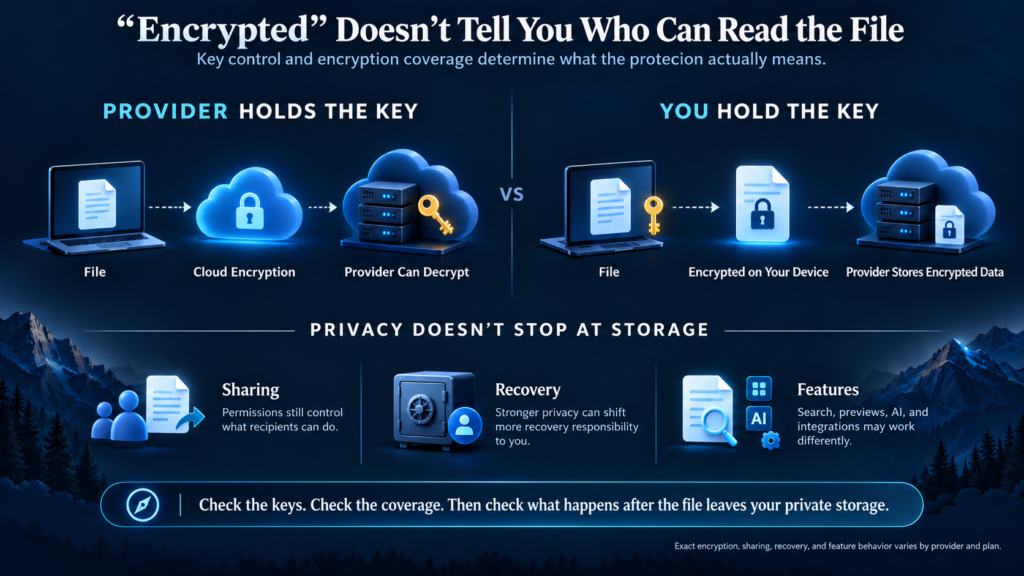
The Encryption Model Matters More Than the Word “Encrypted”
Nearly every reputable cloud service can describe itself as encrypted in some way.
That does not make the services equivalent.
The difference comes down to where encryption happens and who can decrypt the result.
With conventional server-side encryption, a service can encrypt stored data while still controlling the keys. That protects against certain infrastructure threats, but the provider retains the technical ability to decrypt the information when its systems or policies require it.
Client-side, end-to-end encryption changes that relationship.
The file is encrypted before it leaves the user’s device, and the provider stores an encrypted version without possessing the normal means to read the original content.
For this comparison, another distinction matters just as much: scope.
A provider may apply private encryption to:
- every stored file automatically
- file contents but not all metadata
- a dedicated encrypted folder
- particular sharing workflows
- only certain plans or applications
That is why checking a box labeled “AES-256 encryption” is not enough to compare secure cloud storage.
The encryption algorithm matters, but key control and coverage determine what the protection actually means in everyday use.
This article intentionally stops at that practical distinction. The deeper mechanics of zero-knowledge architecture, key generation, authentication, and cryptographic recovery deserve their own explanation rather than being squeezed into a product comparison.
Secure Sharing Is Part of the Privacy Model
A file can be protected perfectly while sitting in your account and become exposed the moment it is shared badly.
That makes file sharing one of the most important differences between privacy-focused cloud storage services.
Useful controls can include:
- password-protected links
- expiration dates
- download restrictions
- recipient-specific invitations
- view and edit permissions
- access revocation
- encrypted file requests
- limits on how many times a link can be opened
The exact combination varies by provider and plan.
Sync.com and Tresorit put substantial emphasis on access controls around shared content. Internxt supports encrypted links, passwords, and recipient permissions. Proton Drive keeps shared Drive data within its end-to-end encrypted model. Filen also builds sharing around its encrypted storage architecture.
pCloud illustrates why the details matter. Its regular cloud sharing tools are flexible, but its client-side encrypted Crypto area represents a separate privacy model.
Before using any secure cloud storage service for sensitive collaboration, check what happens after the file leaves your private folder.
A provider may protect stored data from itself while still giving the recipient enough access to download, copy, or redistribute a shared file. Encryption cannot undo permissions you intentionally grant.
Stronger Privacy Changes Recovery
Provider-inaccessible encryption removes one source of access.
It can also remove one source of rescue.
When a conventional provider controls the necessary keys, account-recovery systems may have more flexibility to restore access after credentials are lost.
A zero-knowledge service faces a different constraint. If it genuinely does not possess the information needed to decrypt your files, support staff cannot simply unlock the data because you prove ownership of the account.
That makes recovery information unusually important.
Depending on the provider, recovery may involve:
- recovery codes or keys
- trusted devices
- recovery phrases
- alternate account recovery methods
- previously authenticated sessions
The exact process varies, but the principle is consistent: privacy can shift responsibility from the provider to the user.
Filen makes that consequence particularly explicit by warning users to preserve their recovery key. Other providers implement different recovery systems, so the right question is not simply whether password recovery exists.
Ask what happens to the encryption keys when the password changes or disappears.
That answer tells you whether an account-recovery process can restore the files themselves or only restore access to an empty account shell.
Privacy Can Also Affect Everyday Convenience
Encryption does not make cloud storage unusable, but it can change what a provider can easily do with stored data.
Features such as server-side search, automatic media analysis, document indexing, AI processing, previews, and third-party integrations often work most easily when the service can process file contents.
Privacy-focused providers have to solve those problems differently.
Some perform more work on the user’s device. Others build their own encrypted document or collaboration tools. Certain features may be unavailable or less mature because the server cannot simply inspect every file.
That creates a real tradeoff.
The service with the strongest privacy architecture is not automatically the service with the richest editing ecosystem. Likewise, a provider with convenient search, automated organization, and broad integrations is not automatically weak on security.
The relevant question is whether the features you need can operate without undermining the privacy model that brought you to encrypted cloud storage in the first place.
For everyday personal files, the difference may barely be noticeable.
For collaborative office work, automated media libraries, or workflows built around third-party integrations, it can become much more important.
How to Compare Encrypted Cloud Storage
Start with the privacy boundary rather than the price.
Check What the Encryption Actually Covers
Find out whether client-side or end-to-end encryption applies to the whole account or only selected folders.
File contents are the obvious concern, but filenames, folder names, thumbnails, and other metadata can also reveal information.
Find Out Who Controls the Decryption Keys
A provider storing encrypted files is different from a provider that cannot decrypt those files.
Look for clear documentation describing where encryption occurs and whether the service itself can obtain the keys required to read stored data.
Review Account Recovery Before You Need It
Strong privacy can make forgotten credentials more consequential.
Understand the recovery process, export any required recovery keys, and store them somewhere separate from the cloud account they protect.
Examine Sharing as Closely as Storage
Private files rarely stay private forever.
Check passwords, expiration dates, recipient permissions, revocation, download controls, and whether sharing preserves the encryption model.
Look at Account Security Beyond Encryption
End-to-end encryption does not protect a file from someone who successfully logs into your account as you.
Strong authentication, device management, session controls, and careful recovery settings still matter.
Match Capacity to the Files You Actually Store
A few hundred gigabytes may be enough for sensitive documents.
Photos, video, audio, design projects, and other media can quickly push storage requirements into multiple terabytes.
Capacity should be evaluated after the privacy model, not instead of it.
Look for Evidence, Not Just Security Language
Terms such as military-grade, private, secure, and encrypted are easy to place on a product page.
More useful signals include clear technical documentation, open-source applications where appropriate, published security information, independent audits, and precise explanations of what the provider can and cannot access.
Conclusion
Encrypted cloud storage is not one security model with six different logos.
Proton Drive, Sync.com, Tresorit, Filen, and Internxt all build provider-inaccessible encryption into their broader storage experience, but they emphasize different parts of the problem. Proton combines privacy with a growing productivity ecosystem. Sync.com leans heavily into secure sharing. Tresorit adds stronger collaboration controls. Filen emphasizes open-source transparency and flexible storage capacity. Internxt combines zero-knowledge storage with a wider privacy suite and post-quantum encryption strategy.
pCloud makes a different compromise by separating ordinary cloud storage from its client-side encrypted Crypto folder.
Those differences matter more than whether a pricing page simply says the files are encrypted.
A useful comparison starts with three questions:
What is encrypted? Who can decrypt it? What changes when the file needs to be shared or recovered?
Once those answers are clear, storage capacity, pricing, collaboration, and convenience become much easier to judge.
Frequently Asked Questions
Is All Cloud Storage Encrypted?
Most major cloud storage providers use encryption somewhere in their systems, but the implementation varies. A service may encrypt data during transfer and on its servers while still retaining the keys needed to decrypt it.
Privacy-focused services go further by encrypting files on the user’s device and limiting the provider’s ability to access the original content.
What Is the Difference Between Encrypted and Zero-Knowledge Cloud Storage?
Encrypted cloud storage is a broad term. It only tells you that encryption is being used.
Zero-knowledge storage describes a more specific privacy model in which the provider does not have the information needed to decrypt your protected files.
A future zero-knowledge guide should examine that architecture in more depth because providers do not always use the terminology identically.
Can an Encrypted Cloud Storage Provider See My Files?
It depends on the encryption model.
If the provider controls the decryption keys, it may technically be able to access the file contents. With properly implemented provider-inaccessible or zero-knowledge encryption, the provider should not possess the keys required to read protected files.
Can I Share Files From Encrypted Cloud Storage?
Yes. Privacy-focused cloud storage services can support file and folder sharing, but the security controls differ. Depending on the service, you may be able to add passwords, expiration dates, recipient permissions, download restrictions, or access revocation.
What Happens If I Forget My Password?
The answer depends on how the service handles encryption keys and account recovery.
Some providers offer recovery codes or trusted recovery methods. With stronger zero-knowledge designs, losing the credentials and recovery information may make encrypted files permanently inaccessible.
Does End-to-End Encryption Protect Me if My Account Is Hacked?
Not necessarily. End-to-end encryption protects data against parties that do not possess authorized access. If an attacker steals your credentials, compromises an authenticated device, or takes over an active session, they may gain access as though they were you.
Account security still matters.
Is pCloud Crypto the Same as Account-Wide End-to-End Encryption?
No. pCloud Crypto provides client-side, zero-knowledge encryption inside a dedicated Crypto folder. Files stored elsewhere in the pCloud account use the service’s regular storage security model.
That separation is one of the major differences between pCloud and providers that apply end-to-end encryption automatically across their main storage area.
0 Comments