Replacing Google Photos is harder than finding somewhere else to upload pictures.
Google Photos combines automatic phone backup with a searchable photo library, albums, sharing, editing, memories, and access across devices. Its search can find photos by people, places, and objects without manual tagging, and supported users can also use more conversational search through Ask Photos.
A useful alternative therefore has to do more than provide cloud storage.
Some replacements focus on privacy. Others let you keep the entire photo library on your own server or NAS. Apple and Amazon offer strong alternatives inside their existing ecosystems, while Flickr remains more focused on photography, presentation, and sharing.
The right replacement depends on which part of Google Photos you actually want to replace.
Key Takeaways
- Replacing Google Photos means replacing a photo-management system, not just cloud storage. Automatic uploads, search, albums, sharing, and library organization are often more important than the headline storage allowance.
- Hosted and self-hosted alternatives solve different problems. Hosted services reduce maintenance, while Immich and NAS-based options give users more control over where their original photos are stored.
- Search becomes increasingly important as a photo library grows. Face recognition, location search, object search, and other discovery tools can determine whether thousands of unorganized photos remain easy to find.
- Privacy can change how photo intelligence is delivered. Some alternatives process faces, search, and other photo data locally or on user-controlled hardware rather than relying on provider-side analysis.
- The right replacement depends heavily on the ecosystem and workflow already in use. Apple households, Prime members, privacy-focused users, self-hosters, and photography-focused users can reasonably prefer different services.
- Moving the files is only part of leaving Google Photos. Albums, dates, metadata, videos, sharing, and search should be checked in the new library before the original Google Photos collection is removed.
Disclosure: This website contains affiliate links. I may earn a commission if you make a purchase through these links, at no additional cost to you.

Google Photos Alternatives at a Glance
| Alternative | Best Fit | Hosting Model | Automatic Mobile Backup | Search and Organization | Main Tradeoff |
|---|---|---|---|---|---|
| Ente Photos | Privacy-focused users | Hosted | Yes | Faces, natural-language search, albums, memories | Large libraries require a paid storage plan |
| Immich | Self-hosting and maximum control | Self-hosted | Yes | Faces, contextual search, OCR, locations, albums | You maintain and back up the server |
| iCloud Photos | Apple users | Hosted | Yes | Apple Photos search, albums, memories, shared libraries | Best experience stays inside the Apple ecosystem |
| Amazon Photos | Prime members | Hosted | Yes | People, places, things, dates | Unlimited Prime benefit applies to photos, not unlimited video |
| Synology Photos | NAS owners | Self-managed NAS | Yes | Photo-library organization on your own storage | Requires hardware and administration |
| Flickr | Photography and presentation | Hosted | Yes with Pro tools | Albums, galleries, photography-focused organization | Less focused on smart personal-library management |
What a Google Photos Replacement Needs to Do
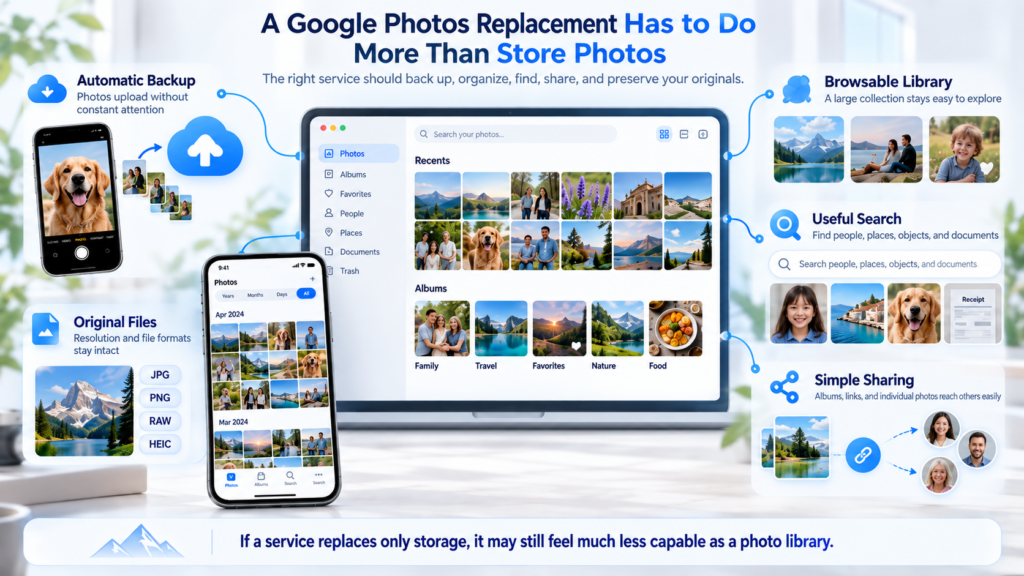
Google Photos solves several problems at once.
That matters because replacing only one of them can leave a service feeling much less capable even when the storage itself works perfectly.
Back Up Photos Without Constant Attention
The first requirement is automatic upload.
A good replacement should be able to take photos from a phone and move them into the library without requiring a manual upload after every trip, event, or ordinary day.
Google Photos already does this automatically when backup is enabled.
Any serious replacement needs to make the same basic workflow dependable.
Make a Large Library Browsable
A folder containing 40,000 image files is technically a photo archive.
It is not necessarily a useful photo library.
Timeline browsing, albums, favorites, locations, face grouping, and other organization tools become increasingly important as the collection grows.
Help You Find Photos You Did Not Organize Manually
Google Photos has made search one of the hardest features to leave behind.
Users can search for people, locations, objects, documents, and other visual concepts without manually tagging every image.
Alternatives do not need to reproduce Google’s implementation exactly, but weak search becomes noticeable quickly when years of photos are involved.
Make Sharing Simple
A photo library is rarely completely private.
Family albums, trip photos, event galleries, and individual images need to reach other people without complicated export workflows.
Shared albums and links therefore matter almost as much as storage.
Preserve the Original Files
A photo service should make it clear whether uploaded images remain at their original resolution and in their original formats.
That becomes especially important when the service is expected to hold the primary cloud copy rather than merely a viewing version.
Ente Photos: A Privacy-Focused Google Photos Alternative
Ente Photos is one of the more direct alternatives for someone who likes the convenience of Google Photos but wants a different privacy model.
Photos are end-to-end encrypted before storage, and Ente says its applications are open source. That privacy layer does not come at the expense of the basic photo-library experience.
Why Ente Feels Like a Real Photo Service
Ente offers:
- automatic photo backups
- Android and iOS apps
- desktop and web access
- face recognition
- natural-language photo search
- albums
- memories
- family plans
- public links
- shared albums
Face recognition runs on the user’s device, while its search system is designed to work without giving Ente access to the contents of the photo library.
The current Ente Photos feature and pricing page lists end-to-end encrypted backup, on-device face recognition, natural-language search, memories, shared albums, and apps for Android, iOS, Windows, macOS, Linux, and the web.
Sharing Does Not Abandon the Privacy Model
Sharing is often where encrypted photo services become awkward.
Ente handles both shared albums with other users and public links for people who do not have an Ente account. Its documentation says shared content remains end-to-end encrypted, with decryption information handled on the client side rather than being exposed to Ente’s servers.
That makes the service particularly relevant for people who want privacy without turning every family photo album into a technical exercise.
Migrating From Google Photos Is Part of the Product
Ente also provides a direct path for people leaving Google Photos.
Its current documentation tells users to export their library and import the resulting data through the Ente desktop application.
That matters because an alternative becomes much less appealing if years of existing photos cannot move with you.
Best fit: People who want a hosted Google Photos-style library with privacy as a core design requirement.
Main tradeoff: Storage beyond the free allowance requires a subscription, and very large libraries can become more expensive as capacity grows.
Immich: A Self-Hosted Google Photos Experience
Immich takes a fundamentally different approach.
Instead of trusting another company to host the photo library, you run the service yourself on a server you control.
That could mean a home server, supported NAS environment, or another machine configured to run Immich.
Why Immich Is More Than a Photo Folder
Self-hosting would not be especially compelling if the result were simply a web page displaying files.
Immich includes many of the features people associate with modern photo-library software.
Its current feature set includes:
- automatic mobile backup
- album synchronization
- face recognition
- contextual image search
- OCR search for text inside images
- location search
- camera and lens filters
- timeline browsing
- shared albums
- mobile and web access
Its contextual search uses machine-learning models to find photos based on their visual contents rather than requiring every image to be manually tagged.
That makes Immich much closer to a Google Photos replacement than a conventional self-hosted file browser.
The Storage Is Yours
The biggest difference is not a feature in the interface.
It is responsibility.
Immich stores the library on infrastructure you control. There is no provider deciding how many terabytes your subscription includes. Capacity is determined by the storage attached to your server.
The same control also means hardware maintenance, software updates, remote access, and data protection become your responsibility.
Immich Is Not the Backup
This distinction is critical.
Immich automatically creates database backups, but its own documentation explicitly warns that those database backups do not constitute backups of the actual uploaded photos and videos.
The project recommends a 3-2-1 backup approach and tells administrators to separately protect both the uploaded media and the Immich database.
Someone leaving Google Photos for self-hosting therefore needs to think about two different systems:
- Immich manages the photo library.
- Your backup system protects the library if the server fails.
Best fit: Users comfortable running their own infrastructure who want strong Google Photos-style organization without handing the library to another hosted photo service.
Main tradeoff: You become responsible for the server, storage capacity, updates, remote access, and backups.
iCloud Photos: The Natural Alternative for Apple Users
For someone whose phone, tablet, and computer are already Apple devices, replacing Google Photos may not require introducing another company at all.
iCloud Photos is built directly into Apple’s Photos ecosystem.
When synchronization is enabled, photos and videos stored in iCloud appear through the Photos app across supported Apple devices and through iCloud on the web. Changes made on one synchronized device are reflected on the others.
The Apple Ecosystem Is the Main Advantage
The appeal is not simply online storage.
An iPhone user can take a photo and have it become part of the same library viewed on an iPad or Mac without maintaining a separate application and workflow.
Apple can also keep full-resolution originals in iCloud while storing smaller device-optimized copies locally when space is limited. Users can instead choose to download and keep the originals on the device.
That makes iCloud Photos particularly effective when local device storage is smaller than the complete library.
Shared Photo Library Is Strong for Families
Apple’s Shared Photo Library goes beyond sending album links.
A shared library can include up to six people in total, with participants able to contribute photos and see edits and other changes across the shared collection.
For an Apple household, that can be a more natural family-photo setup than maintaining a separate hosted service.
The Ecosystem Is Also the Limitation
iCloud Photos can be accessed from Windows and the web, but the most integrated experience remains tied to Apple hardware and software.
A household mixing Android phones, Windows computers, and Apple devices may find a cross-platform photo service easier to manage.
Current U.S. iCloud+ plans range from 50 GB through 12 TB, with pricing varying by country or region.
Best fit: People whose photo-taking and photo-viewing devices are primarily iPhones, iPads, and Macs.
Main tradeoff: Its strongest experience depends on staying inside the Apple ecosystem.
Amazon Photos: A Strong Option for Prime Members
Amazon Photos has one advantage that can change the storage calculation immediately.
In supported countries, eligible Prime members receive unlimited full-resolution photo storage.
Videos are treated differently. Prime includes only a limited amount of storage for videos and other files unless additional capacity is purchased.
Amazon’s current Photos feature documentation confirms unlimited full-resolution photo storage for eligible Prime users, 5 GB for videos and other files, and automatic camera-roll backup through its mobile apps.
It Includes More Than Storage
Amazon Photos can also organize and search a library by:
- people
- places
- things
- dates
That gives it a more photo-specific experience than simply copying images into Amazon Drive-style folders.
Automatic mobile backup is available on iOS and Android, while desktop backup can protect folders from Windows and Mac computers.
Prime Membership Changes the Value Proposition
Amazon Photos makes the most sense when Prime membership already exists for other reasons.
In that situation, unlimited photo storage may effectively be an existing benefit rather than another dedicated photo subscription.
The calculation changes for someone who would purchase Prime primarily for photo storage.
Video-heavy libraries also need more careful planning because the unlimited benefit applies to photos rather than unlimited video storage.
Best fit: Existing Prime members with large photo libraries and relatively modest video-storage needs.
Main tradeoff: Unlimited storage does not extend to unlimited video, and the strongest value depends on maintaining an eligible Prime subscription.
Synology Photos: For People Who Want Their Photos on Their Own NAS
Synology Photos provides another path away from a fully hosted photo library.
Instead of running a general-purpose self-hosted application such as Immich, the photo service runs on a compatible Synology NAS.
That creates a middle ground between conventional cloud storage and building an entire photo server yourself.
Your NAS Becomes the Photo Library
Synology’s mobile tools can automatically back up photos and videos from a phone to the NAS.
The company says photo backup preserves the original quality and metadata, which matters for users who want their own storage hardware to hold the original files rather than compressed viewing copies.
Mobile backup settings can also control whether older media is uploaded, whether transfers happen only over Wi-Fi, and whether local files that are already backed up can be removed to free phone storage.
The Cost Model Is Different
Synology Photos does not primarily ask how much cloud storage you want to rent each month.
You buy and maintain the NAS and its drives.
That usually means a higher upfront commitment than opening another cloud account, but future capacity is controlled by the storage hardware rather than a photo-service subscription tier.
Owning the NAS Does Not Eliminate Backup
A NAS can provide redundancy, but it should not automatically be treated as the only backup.
Hardware can fail. Files can be accidentally deleted. Malware, theft, fire, and administrative mistakes can affect storage that appears redundant.
Anyone using a NAS as the primary home of a photo library should still maintain another independent copy.
Best fit: People who already own a Synology NAS or want their original photo library stored on hardware they control.
Main tradeoff: Hardware ownership brings setup, maintenance, drive replacement, and backup responsibility.
Flickr: For Photo Storage, Presentation, and Community
Flickr belongs in this comparison for a different reason.
It is less focused on recreating Google’s personal memory-management system and more focused on photography itself.
That makes it relevant to users whose library is also something they want to organize, display, and share publicly or privately.
Flickr Pro Removes the Storage Ceiling
Flickr Pro currently includes unlimited uploads, unlimited private photos, and automatic backup through AutoUploadr.
For a photographer with a large collection, that eliminates the normal question of whether the library fits inside a 1 TB or 2 TB storage tier.
Flickr also provides albums, galleries, privacy controls, statistics, and a long-established photography community.
It Replaces a Different Part of Google Photos
Someone leaving Google Photos because they want a polished private family library with advanced personal search may find other alternatives closer to the original experience.
Someone who wants a large photo collection that can also function as a portfolio, public gallery, or community presence may find Flickr more compelling.
That distinction is why Flickr should not be judged solely by whether it duplicates every Google Photos feature.
Best fit: Photography-focused users who care about large-scale storage, galleries, presentation, and sharing.
Main tradeoff: Its strengths center more on photography and presentation than automated personal-memory management.
Hosted, Self-Hosted, or NAS-Based?
The most important decision may happen before choosing a specific service.
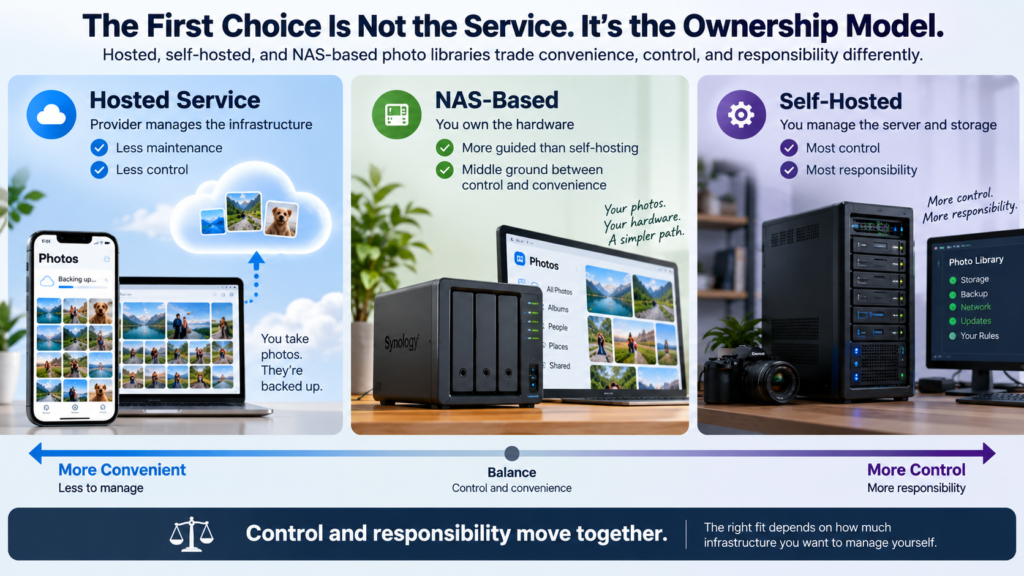
These alternatives use three very different ownership models.
Hosted Services Keep Infrastructure Out of the Way
Ente, iCloud Photos, Amazon Photos, and Flickr manage the servers and storage infrastructure.
You install an app, create an account, and use the service.
That removes most technical maintenance but also means accepting the provider’s storage model, pricing, policies, and product direction.
Self-Hosting Gives You the Most Control
Immich puts the server under your control.
That gives you flexibility over capacity, storage location, networking, and the broader infrastructure around the photo library.
It also means there is no provider responsible for fixing your failed disk, misconfigured server, broken backup, or inaccessible network connection.
Control and responsibility arrive together.
A NAS Sits Between Those Models
Synology Photos provides a more appliance-like path.
You still own the hardware and storage, but the NAS operating system and photo software are packaged together rather than assembled as a completely independent self-hosted stack.
That can reduce some complexity without turning the library back into conventional hosted cloud storage.
The Hardest Google Photos Features to Replace
Moving the original image files is relatively straightforward.
Replacing the experience built around them can be harder.
Search Gets More Important as the Library Grows
A small photo library can survive on folders and albums.
A 15-year collection containing tens of thousands of photos is different.
Google Photos can search by visual content, people, places, and text-related concepts without requiring users to manually tag every image.
Immich and Ente both offer increasingly sophisticated search systems, but the exact capabilities and results will differ from Google’s.
Anyone who regularly searches for vague memories such as “red car at the beach” or “receipt from the restaurant” should test the replacement’s search before committing the entire library.
Faces Are More Than a Convenience
Face grouping can turn years of unorganized photos into browsable collections of family and friends.
Ente performs face recognition on the device, while Immich can recognize and group faces through its own machine-learning system.
Other services handle people recognition differently, and some users may prefer not to use facial analysis at all.
Automatic Creations Are Easy to Underestimate
Google Photos can generate memories, highlight videos, collages, animations, and other collections automatically.
Those features may seem secondary until they disappear.
Some alternatives have their own memory features, but users who enjoy Google’s automated resurfacing of old photos should check what the replacement offers rather than assuming every photo library behaves the same way.
Family Sharing Can Affect the Whole Household
Switching is easier when only one person uses the library.
Partner sharing, family collections, shared albums, comments, and collaborative uploads can make migration more complicated.
The replacement needs to work for the people who receive and contribute photos as well as the person paying for storage.
Privacy and Photo Intelligence Pull in Different Directions
Modern photo libraries can learn a great deal from images.
Face recognition, object search, location grouping, text extraction, and AI-powered queries all require some form of image analysis.
The important privacy question is where that analysis happens and who has access to the results.
Ente emphasizes on-device analysis while keeping the photo library end-to-end encrypted.
Immich can run its machine-learning features on infrastructure controlled by the user.
Google takes a different approach within its broader Photos ecosystem, including optional AI-assisted search experiences such as Ask Photos.
These are not simply better and worse versions of the same design.
They represent different priorities.
A reader may value Google’s integrated intelligence more than minimizing provider access.
Another may accept a smaller feature set in exchange for stronger privacy. A self-hoster may want sophisticated image recognition while keeping the processing on personally controlled hardware.
How to Choose a Google Photos Alternative
Start with the feature you would miss most if Google Photos disappeared tomorrow.
That tends to produce a clearer decision than comparing long feature lists.
Decide Where You Want the Originals to Live
The first choice is architectural.
Do you want a company to host the library, a NAS in your home, or a server you manage yourself?
That decision narrows the options immediately.
Check Automatic Mobile Backup First
For most people, the phone creates the majority of new photos.
A service that looks excellent on desktop but handles mobile uploads poorly will become frustrating quickly.
Test backup behavior before migrating the full library.
Evaluate Search With Your Own Photos
Marketing screenshots cannot tell you whether search works well for the way you remember images.
Import a representative collection and try the searches you actually use.
Look for people, places, screenshots, receipts, objects, trips, and older photos that were never manually organized.
Think About Everyone Who Uses the Library
A technically perfect self-hosted solution may be the wrong choice if other family members find it difficult to use.
Likewise, an ecosystem-specific service becomes less attractive when the household uses several operating systems.
Photo storage is often a shared workflow even when one person manages the account.
Compare Cost at Your Real Library Size
Do not compare only entry plans.
Check how much storage the current library uses, how quickly it is growing, and how much video is included.
Amazon Photos, for example, treats photos and videos differently for eligible Prime users. Ente uses storage tiers. Synology and Immich shift more of the cost toward hardware and infrastructure.
Those models can produce very different long-term costs.
Decide How Much Maintenance You Want
Hosted services trade some control for convenience.
Self-hosting trades convenience for control.
Neither model is automatically better.
The important question is whether you actually want responsibility for storage hardware, backups, software updates, networking, and troubleshooting.
How to Move Away From Google Photos Safely
A migration should create another verified copy of the library before anything is removed from Google.
1. Check How Large the Library Is
Know approximately how much data needs to move before choosing the destination.
Storage requirements can eliminate some options immediately.
2. Decide Between Direct Transfer and Google Takeout
Google supports exporting Photos data through Google Takeout. In supported cases, Google can also transfer a copy directly to participating third-party services.
Direct transfer can be simpler when the destination supports it.
Takeout gives you a downloadable archive that can also become part of your independent backup.
3. Preserve the Export Until Migration Is Finished
Google notes that original photo or video metadata remains embedded in the files where available, while some additional Google Photos information, such as comments, may be exported separately in JSON files.
That matters because another service may not reconstruct every Google-specific album, edit, comment, or organizational detail automatically.
Keep the original export until the new library has been checked.
4. Import a Small Test Before Moving Everything
A test batch can reveal problems with:
- timestamps
- filenames
- albums
- RAW files
- Live Photos
- videos
- duplicate handling
- metadata
- search indexing
Fixing those issues after importing 80,000 photos is much harder.
5. Verify the New Library
Do not judge the migration by the number of uploaded files alone.
Open old and recent photos. Check videos. Search for known people and locations. Review albums and dates.
Make sure the replacement works as a library, not merely as storage.
6. Keep Google Photos Until the New Copy Is Confirmed
Exporting or transferring photos does not automatically delete the originals from Google.
That is useful.
Keep the existing library intact until the replacement has been fully imported and verified.
For irreplaceable photos, maintaining another independent backup after the migration is also prudent.
Conclusion
There is no single replacement for Google Photos because people use Google Photos for different reasons.
Ente Photos comes closest for users who want a hosted photo library with a stronger privacy model. Immich provides a surprisingly capable Google Photos-style experience for people willing to run their own server. iCloud Photos fits naturally into Apple households, while Amazon Photos can offer exceptional storage value to existing Prime members.
Synology Photos makes sense when the goal is to bring the library onto personally owned NAS hardware. Flickr takes another direction entirely, emphasizing large-scale photo storage, presentation, and community.
The deciding factor is not simply how many gigabytes each service offers.
Ask what you would actually miss from Google Photos: automatic backup, search, faces, memories, sharing, privacy, or the freedom to control where the originals live.
The strongest alternative is the one that replaces those parts without creating a new problem you care about more.
Frequently Asked Questions
What Is the Closest Alternative to Google Photos?
That depends on what “closest” means.
Immich reproduces many Google Photos-style capabilities, including automatic mobile backup, face recognition, contextual search, albums, and location-based organization, but it requires self-hosting.
Ente provides a more conventional hosted experience with automatic backup, faces, search, memories, and sharing while emphasizing end-to-end encryption.
Is There a Private Alternative to Google Photos?
Yes.
Ente Photos is built around end-to-end encrypted photo storage and performs features such as face recognition on the user’s device. Self-hosted platforms such as Immich provide another privacy approach by allowing the user to control the server where the library is stored.
Is There a Self-Hosted Alternative to Google Photos?
Immich is a prominent self-hosted option designed specifically around photo and video management.
It includes mobile backup, face recognition, search, albums, and other Google Photos-style features. The user is responsible for running and independently backing up the server.
Can I Move My Entire Google Photos Library Somewhere Else?
Yes, although the destination determines how much of the existing organization can be preserved.
Google Takeout can export a copy of the library, and Google also supports direct transfer to participating third-party services in some cases.
Albums, comments, edits, and Google-specific metadata may require extra attention during migration.
Which Google Photos Alternatives Automatically Back Up Phone Photos?
Ente, Immich, iCloud Photos, Amazon Photos, Synology Photos, and Flickr Pro all provide mechanisms for automatically uploading or backing up mobile photos, although the behavior and configuration differ between services.
Can I Keep Photos at Their Original Quality?
Yes, but confirm the settings and plan before migrating.
Apple can retain full-resolution originals in iCloud, Amazon offers full-resolution photo storage, and Synology says its mobile photo backup preserves original quality.
Other alternatives also preserve originals, but storage capacity and configuration still matter.
Do I Need Cloud Storage if I Self-Host My Photos?
Not necessarily, but self-hosting does not eliminate the need for backup.
A photo server can be the primary library while another local or off-site system protects it against hardware failure, accidental deletion, theft, or other loss.
Immich explicitly recommends maintaining separate backups of both uploaded media and its database.
Can I Use More Than One Photo Service?
Yes.
Some people keep one service for convenient everyday browsing and another independent system for backup or long-term originals.
The important distinction is understanding which copy is the working photo library and which copies exist primarily for recovery.
0 Comments