A server can store files on its own disk. The problem starts when several servers need to work with the same files.
Keeping separate copies creates synchronization problems. Attaching storage to one server can make that server a bottleneck or single point of dependency. Applications that expect normal folders and file paths may also be difficult to move directly onto object storage without changing how they access data.
Cloud file storage solves a different problem.
It provides a shared file system that multiple servers, applications, containers, or users can access over a network. The storage still behaves in familiar ways: files live inside folders, applications use paths to locate them, and access can be controlled through established file-system permissions.
The difference is that the underlying file infrastructure is delivered from the cloud rather than being tied to one local disk or a traditional file server.
Understanding that model makes it much easier to see where cloud file storage fits alongside object storage, block storage, network-attached storage, and consumer services such as Google Drive or Dropbox.
Key Takeaways
- Cloud file storage is infrastructure, not simply online space for files. Its defining purpose is to give multiple systems access to a shared hierarchical file system through familiar file operations.
- Shared access is what makes the model useful. Several servers, containers, or users can work with the same files without maintaining separate copies on every machine.
- NFS and SMB allow existing applications to keep using familiar file-system behavior. That can make cloud file storage particularly useful for applications that already expect directories, paths, permissions, and shared files.
- File, object, and block storage solve different access problems. The right choice depends less on which technology is more advanced and more on how an application expects to read and write data.
- Managed cloud file services remove much of the infrastructure work, but not architectural responsibility. Networking, permissions, performance, availability, backup, and cost still need to match the workload.
- Shared storage introduces challenges that local disks can hide. Concurrent access, network latency, permissions, and dependence on a common file system all become part of application design.
Disclosure: This website contains affiliate links. I may earn a commission if you make a purchase through these links, at no additional cost to you.
What Is Cloud File Storage?
Cloud file storage is a way of storing data in a cloud environment while preserving the familiar structure of files, folders, directories, and paths.
A file might still be addressed like this:
/projects/website/assets/logo.svgor, in a Windows environment:
\\fileserver\projects\website\assets\logo.svg
Applications interact with the data through normal file-system operations such as opening, reading, writing, renaming, and deleting files.
What changes is where the file system lives.
Instead of depending on storage physically attached to one machine, the file system is available over a network and can be mounted by other systems that need access.
AWS defines cloud file storage as storage that gives servers and applications access to data through shared file systems.
Microsoft describes Azure Files similarly as fully managed cloud file shares available through standard SMB and NFS protocols.
How Cloud File Storage Works
The implementation differs between cloud platforms, but the basic workflow is relatively consistent.
A File System Is Provisioned
The cloud provider creates or allocates the infrastructure behind the file share.
With a managed service, the customer does not normally configure individual storage disks or install and maintain a traditional file server from scratch.
Instead, the service exposes a managed filesystem with capacity, performance, networking, and availability options.
Clients Connect Over a Network
The systems that need the data establish network connectivity to the file service.
Those clients might be:
- virtual machines
- physical servers
- containers
- Kubernetes pods
- application servers
- employee workstations
- on-premises systems connected to the cloud
Network configuration determines which systems can reach the storage in the first place.
The File Share Is Mounted
A client mounts the remote file system so that applications can interact with it through normal filesystem paths.
A Linux system might mount an NFS share into a directory such as:
Applications can then treat that location much like another filesystem available to the operating system.
Amazon EFS, for example, supports NFS 4.0 and 4.1 and can be mounted through standard Linux NFS tools or the EFS mount helper.
Applications Use Familiar File Operations
Once mounted, applications can perform normal operations such as:
- create a file
- open a file
- read data
- write data
- rename a file
- create directories
- change permissions
- delete files
This compatibility is one of the strongest reasons cloud file storage exists.
Applications written around filesystem paths do not necessarily need to be redesigned around object-storage APIs.
Several Clients Can Use the Same Files
The file system becomes a shared data layer.
Multiple systems can read from it, and depending on the application and file-system behavior, multiple clients can also write to it.
That shared access is useful, but it introduces another issue: applications need to behave correctly when more than one process can touch the same data.
File locking, permissions, consistency, and application-level coordination can therefore become important.
NFS and SMB Connect Systems to Shared File Storage
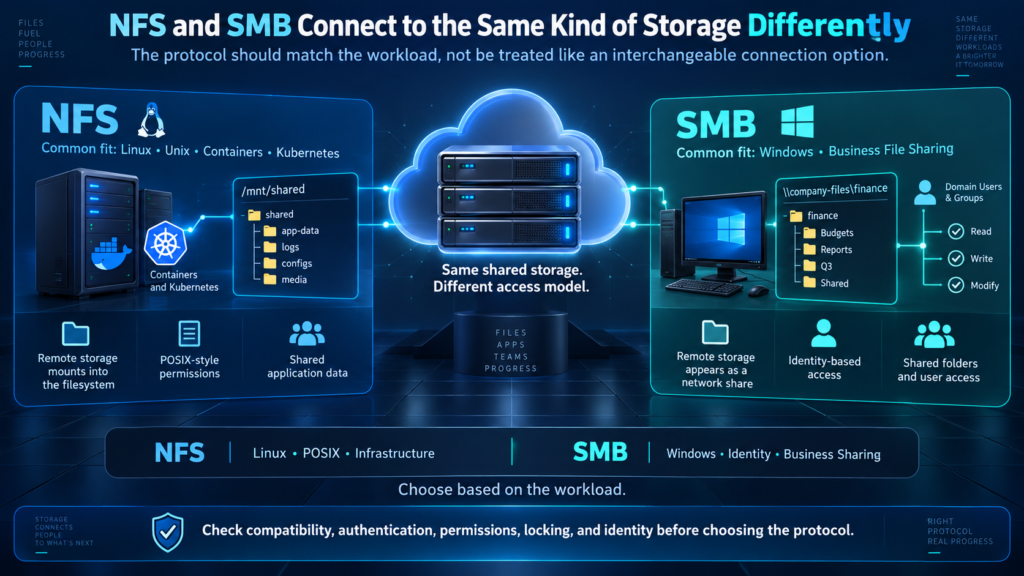
Two protocols appear repeatedly when working with cloud file systems: NFS and SMB.
They both allow systems to access remote files, but they come from different computing traditions and are commonly used in different environments.
NFS Is Common in Linux and Unix Environments
NFS stands for Network File System.
It allows a remote filesystem to be mounted into the local directory structure of another system.
For applications running on Linux, the result can look much like an ordinary local directory even though the data is actually being accessed over the network.
NFS is widely used for:
- Linux application servers
- web infrastructure
- containers
- Kubernetes
- development environments
- media processing
- high-performance computing
- shared application data
Amazon EFS uses NFS, while Google Filestore is built around managed NFS file shares. Azure Files also supports NFS for Linux-focused workloads.
SMB Is Common in Windows and Business File Sharing
SMB stands for Server Message Block.
It is closely associated with Windows file sharing, although modern SMB clients are also available on Linux and macOS.
A business file share such as:
is a familiar example of the model.
SMB can support features such as:
- shared folders
- identity-based access
- Windows-style permissions
- file locking
- encrypted network connections
- user home directories
- application file shares
Microsoft’s Azure Files supports SMB across Windows, Linux, and macOS clients, along with identity-based authentication and other enterprise file-sharing capabilities.
NFS and SMB Are More Than Connection Methods
The protocol affects how applications and users interact with the file system.
That can include differences in:
- authentication
- file permissions
- operating-system compatibility
- file locking
- identity mapping
- network encryption
- application expectations
A Linux application built around POSIX-style permissions may naturally fit an NFS environment.
A Windows application expecting Active Directory identities, SMB shares, and Windows access control lists may fit SMB better.
The protocol should therefore follow the workload rather than being treated as an interchangeable checkbox.
Cloud File Storage Is Different From Consumer Cloud Storage
The term cloud file storage can sound similar to Dropbox, Google Drive, OneDrive, or another service where people upload documents.
The underlying jobs are different.
Consumer cloud storage is usually designed around people:
- syncing files between personal devices
- sharing links
- collaborating on documents
- accessing files through apps and browsers
Infrastructure file storage is typically designed around systems and applications that need filesystem access.
An application may need to open:
/config/settings.json
or write output into:
/shared/render-jobs/
It expects a filesystem, not a browser-based storage dashboard.
File Storage, Object Storage, and Block Storage Solve Different Problems
Cloud platforms generally expose three major storage models:
- file storage
- object storage
- block storage
They can all hold data, but they expose that data to applications differently.
| Storage Type | Organizes Data As | Typical Access Model | Common Fit |
|---|---|---|---|
| File storage | Files and folders | Filesystem paths, NFS, SMB | Shared application data, file servers, content systems |
| Object storage | Objects inside buckets | APIs and HTTP-based requests | Backups, archives, media repositories, cloud-native data |
| Block storage | Raw storage blocks | Attached volumes presented like disks | VM disks, databases, transactional workloads |
Understanding Cloud Storage Models
File Storage Preserves a Filesystem
An application can work with:
The hierarchy itself is part of the storage model.
That makes file storage useful when existing applications expect:
- directories
- filenames
- filesystem permissions
- relative paths
- shared folders
- file locking
Object Storage Uses Objects and APIs
Object storage organizes data as objects inside a storage namespace such as a bucket.
Applications typically access those objects through APIs rather than mounting the storage as an ordinary shared filesystem.
This model can scale extremely well for workloads such as:
- backups
- archives
- media libraries
- application assets
- logs
- data lakes
- static content
The tradeoff is compatibility.
An application designed to open normal filesystem paths may need to be changed before it can work directly with object-storage APIs.
AWS specifically identifies this compatibility difference as one reason shared file storage remains useful for existing applications.
Block Storage Behaves More Like a Disk
Block storage presents raw storage capacity that an operating system can use to create a filesystem or database volume.
A virtual machine might attach a block-storage volume and treat it similarly to a local disk.
That makes block storage particularly useful for:
- operating-system disks
- databases
- transactional systems
- workloads requiring predictable low-latency storage
The important difference is sharing.
A block volume is commonly associated more directly with a host, while a shared file system is explicitly designed to give multiple clients access through filesystem semantics.
File storage may even use block storage underneath, but the file service adds the shared filesystem layer on top.
Why Existing Applications Often Fit File Storage
Many applications were written long before object storage became a standard cloud architecture.
They expect a filesystem.
An application might assume it can:
- write logs into
/var/app/logs - read templates from
/shared/templates - create a user folder
- rename a file atomically
- scan a directory
- check filesystem permissions
- lock a file while changing it
Moving that application directly to object storage could require code changes because object storage does not expose the same interface.
Cloud file storage provides another path.
The application can move to cloud infrastructure while continuing to use familiar filesystem operations.
Microsoft explicitly positions Azure Files for lift-and-shift workloads that already expect shared file storage, allowing applications to move without rewriting their storage logic.
That does not mean file storage is always the best long-term architecture.
A newly designed cloud-native application may benefit from using object storage directly.
But compatibility can make shared file storage much more practical during migration.
Managed Cloud File Storage Changes Who Runs the File Server
A traditional shared filesystem usually requires more than disks.
Someone has to manage:
- storage hardware
- the file-server operating system
- patches
- capacity
- redundancy
- network configuration
- service availability
- hardware replacement
- monitoring
Cloud file storage can shift much of that infrastructure work to the provider.
With a managed service, the customer creates a file share or filesystem and consumes it as a cloud resource.
Azure Files, for example, is fully managed. Microsoft handles the underlying storage infrastructure, hardware maintenance, and service updates rather than requiring customers to maintain their own file server.
Amazon EFS similarly manages the file-storage infrastructure and automatically adjusts capacity as files are added or removed.
That simplification is valuable, but managed does not mean management disappears entirely.
Customers still make architectural decisions around:
- networking
- identity
- permissions
- performance
- redundancy
- backups
- recovery
- monitoring
- cost
A Shared File System Still Needs a Recovery Plan
High availability and backup solve different problems.
A highly available filesystem can continue operating through some infrastructure failures.
That does not necessarily recover:
- an accidentally deleted directory
- a corrupted file
- unwanted application changes
- malicious deletion
- older versions of data
Snapshots, backups, replication, and redundancy each solve different failure scenarios.
Microsoft explicitly treats backup and recovery as separate considerations within Azure Files even though the underlying service is fully managed and offers redundancy options.
How to Tell Whether a Workload Needs Cloud File Storage
The decision should start with application behavior rather than a preferred cloud product.
Look at How the Application Addresses Data
Does the software expect paths such as:
Does it scan directories?
Does it expect normal open, read, write, rename, and delete operations?
If so, filesystem storage may be the natural fit.
Determine Whether Several Systems Need the Same Data
A strong case for shared file storage exists when multiple systems need simultaneous access to the same filesystem.
Examples include:
- several web servers using the same uploads
- Kubernetes pods sharing application data
- rendering nodes reading the same media assets
- employees accessing a common department share
If only one machine needs the disk, block storage may be simpler.
If applications can work directly with objects through APIs, object storage may scale more naturally.
Identify the Protocol the Workload Expects
Existing applications may already assume NFS or SMB.
That requirement can immediately narrow the suitable services.
Do not choose a protocol solely because it is available. Match it to application compatibility, operating systems, identity requirements, and permissions.
Understand the Performance Pattern
Ask what the application actually does.
Is it:
- reading a few huge files?
- writing thousands of tiny files?
- listing large directories?
- serving media?
- processing many metadata operations?
- supporting hundreds of simultaneous clients?
Two applications using the same amount of storage can place completely different demands on a file system.
Define Availability and Recovery Requirements
Consider what happens if:
- one storage component fails
- an availability zone becomes unavailable
- a user deletes important files
- an application corrupts a directory
- an entire region becomes inaccessible
Those scenarios may require different combinations of redundancy, snapshots, backups, or replication.
Ask Whether Object Storage Would Be a Better Long-Term Fit
Filesystem compatibility is useful, but it should not become an architectural constraint by default.
An application designed from scratch may be able to store large files, backups, media, or archives more effectively in object storage.
File storage becomes especially compelling when shared filesystem semantics are themselves a requirement.
Examples of Managed Cloud File Storage
The major cloud platforms provide managed file services, but they do not all expose the same filesystems, protocols, performance models, or workload focus.
These examples illustrate the category rather than rank the products.
Amazon EFS and Amazon FSx
Amazon EFS provides managed elastic NFS storage designed for shared access from AWS compute services such as EC2, ECS, EKS, Lambda, and Fargate.
AWS also offers the Amazon FSx family for workloads that need other file-system technologies, including Windows File Server, Lustre, NetApp ONTAP, and OpenZFS.
That illustrates an important point: cloud file storage is a category, not one universal filesystem design.
Azure Files
Azure Files provides managed SMB and NFS shares that can be mounted concurrently from cloud and on-premises clients.
Microsoft positions the service for use cases including traditional file shares, lift-and-shift applications, application data, development environments, and container workloads.
Google Cloud Filestore
Google Filestore provides managed NFS file storage for workloads running on services such as Compute Engine, Google Kubernetes Engine, and VMware Engine.
Multiple clients can share read and write access to the same filesystem, which makes it useful for applications that require common persistent storage.
Conclusion
Cloud file storage takes a familiar idea and turns it into cloud infrastructure.
The familiar part is the filesystem itself: files, folders, directory paths, permissions, and normal read and write operations.
The important change is that the filesystem can be shared across servers, applications, containers, or users rather than belonging to one local machine.
That makes cloud file storage particularly useful when applications already expect filesystem access or when several systems need to work from a common set of files.
It does not replace every other storage architecture.
Object storage is often a better fit when applications can work directly with scalable object APIs. Block storage remains important when a system needs disk-like access for databases, virtual machines, or other low-latency workloads.
The deciding question is therefore not simply where the data should live.
It is how the systems using that data expect to access it.
When the answer involves shared directories, filesystem paths, NFS, SMB, or existing applications that depend on normal file operations, cloud file storage becomes a natural architectural option.
Frequently Asked Questions
Is Cloud File Storage the Same as Cloud Storage?
Cloud file storage is one type of cloud storage.
It specifically uses a file-and-folder hierarchy and exposes filesystem-style access. Cloud storage can also include object storage and block storage, which organize and expose data differently.
Consumer cloud-drive services may also be described as cloud storage, but managed infrastructure file storage is typically designed for applications, servers, containers, and shared filesystem workloads.
What Is a Shared Cloud File System?
A shared cloud file system is a filesystem stored in cloud infrastructure that multiple clients can access.
Those clients can see a common directory structure and work with the same files according to the filesystem’s permissions and concurrency rules.
Can Multiple Servers Access the Same Cloud File Share?
Yes. Shared access is one of the primary reasons to use cloud file storage.
Services such as Amazon EFS, Azure Files, and Google Filestore are designed to allow multiple clients to connect to shared file data. The exact number of clients, protocols, and performance characteristics depend on the service and configuration.
What Is the Difference Between NFS and SMB?
NFS and SMB are network file-sharing protocols.
NFS is common in Linux and Unix-style environments and is widely used for application servers, containers, and technical workloads.
SMB is closely associated with Windows file sharing and supports features commonly used in enterprise Windows environments, including identity-based access and Windows-style permissions.
Both can provide shared filesystem access, but their authentication, permissions, operating-system integration, and protocol behavior differ.
Is Cloud File Storage the Same as a NAS?
They solve similar shared-file problems but are not necessarily the same architecture.
A traditional network-attached storage device is usually hardware or a storage appliance made available over a network.
Cloud file storage can provide NAS-like filesystem access as a managed cloud service without requiring the customer to operate the physical storage appliance.
What Is the Difference Between File Storage and Object Storage?
File storage organizes data in hierarchical files and directories and exposes normal filesystem operations.
Object storage keeps data as objects in a storage namespace and is normally accessed through APIs.
File storage often fits applications that already expect filesystem paths, while object storage is well suited to workloads designed for highly scalable object access, including backups, archives, media, and cloud-native applications.
Is Cloud File Storage Good for Databases?
It depends on the database and workload.
Some applications and databases are designed to work with shared file systems, while others perform better or are officially supported on dedicated block storage.
Storage should follow the database vendor’s requirements for latency, locking, consistency, filesystem behavior, and durability rather than assuming shared file storage is automatically appropriate.
Can Cloud File Storage Replace an On-Premises File Server?
Yes, in many cases.
Managed SMB or NFS services can replace or extend traditional file servers for shared directories, user data, application files, and other workloads.
Migration planning still needs to account for identity, permissions, network connectivity, performance, and how users or applications will reach the cloud-hosted share.
Does Cloud File Storage Need a Backup?
Yes, when the data needs protection against deletion, corruption, unwanted changes, or other recovery scenarios.
Redundancy and high availability can protect against infrastructure failures, but they do not automatically provide every form of historical recovery.
Snapshots, backups, and replication should be selected according to the failures the organization needs to recover from.
Is Shared Storage the Same as Cloud File Storage?
Not exactly.
Cloud file storage is one form of shared storage.
The broader term shared storage can refer to any storage architecture made available to multiple systems, including file systems, storage-area networks, clustered block storage, and other designs.
Cloud file storage specifically provides shared access through filesystem semantics such as files, directories, and file-level operations.
0 Comments